Self-Paced Tutorial Help
Help Topics
Overview
System Requirements
Launching Full Tutorials
Full
Tutorial Navigation
Launching Specific Topics
Topic
Navigation
Interactive
Training
Overview
Profit Strategies, Inc. tutorials provide you with individual
instruction on our products and systems. Tutorials are
self-paced, meaning that you can progress through the training at a
comfortable rate. Tutorials combine audio, animation, images, and
interaction to lead you through key features, processes, and steps.
Full tutorials provide you in depth coverage of a subject. If you need
to learn about a very specific topic, you can launch that topic
individually. This provides you fast and targeted access to an area of
need. Please review the remaining content in this file to become
familiar with the use of our tutorials.
If you have additional questions on how to use our training,
please
contact Profit Strategies, Inc. at:
806 Linden Ave
Suite 300
Rochester, NY 14625
888.229.4100
Fax 801.881.6507
System
Requirements
Running online tutorials requires the following:
- Adobe Flash
Player (8 or higher)
- Microsoft Internet
Explorer (6 or higher)
- 56k Internet connection (broadband recommended)
- Minimum 800x600 screen resolution (1024x768 recommended)
- Our tutorials feature high-quality audio. While we offer a
text-alternative for all audio, we recommend you take our tutorials on
a computer that has audio and speakers/headphones installed
Top
Launching
Full Tutorials
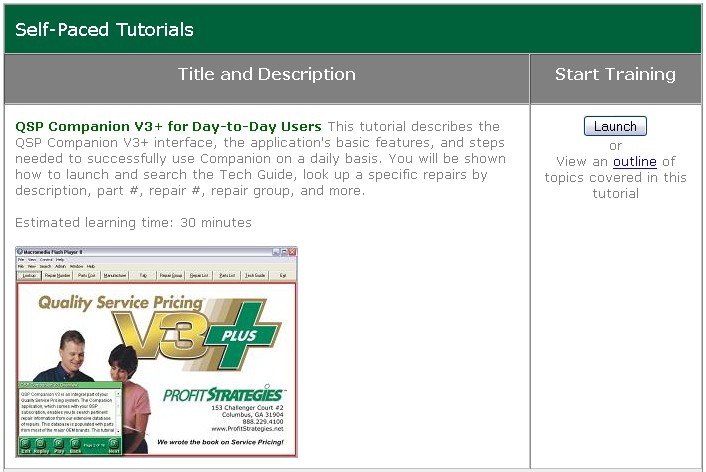
To launch a full tutorial, simply click the Launch
button located in the Start Training column of the Self-Paced Tutorials
table. Please note that the tutorial will launch in a new browser
window. Your standard browser controls will not be available in the
new window, but tutorial
navigation will be provided as outlined in
this document.
Top
Full Tutorial Navigation
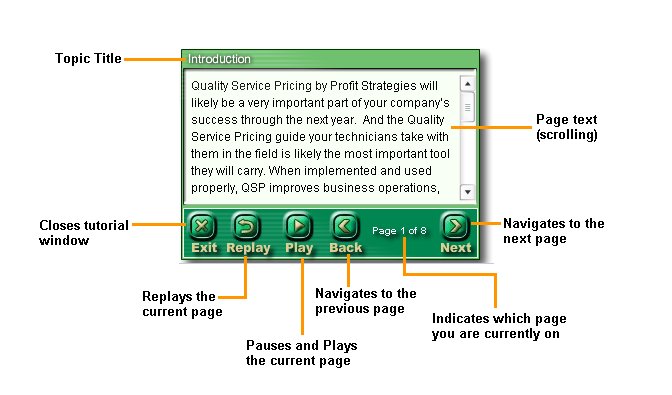
The following navigation is available in the new window when viewing a
full tutorial.
Top
Launching
Specific Topics
To launch a specific topic, click on the outline link in the Start
Training column of the Self-Paced Tutorials table, to expand the list
of topics for that tutorial. From the resulting list of topics, click
the Launch button next to the topic you wish to launch.
Please note that the tutorial will launch in a new browser window. Your
standard browser controls will not be available in the
new window, but topic
navigation will be provided as outlined in
this document.
Top
Topic
Navigation
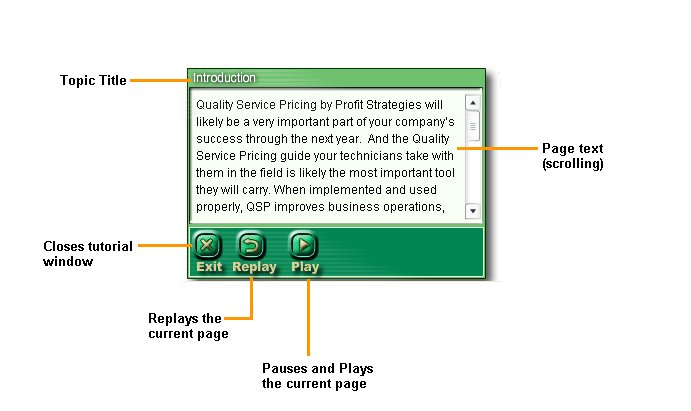
The following navigation is available when viewing a specific topic.
Please note that you cannot navigate to the other topics as in the full
tutorial. In order to navigate to the other topics, please launch the
full tutorial, or follow the steps to launch individual topics as
outlined above.
Top
Interactive
Training
At times during a tutorial you may be asked to perform certain steps or
respond to questions. When you see the
large orange arrow point to a location on the screen, this is your
indicator that you need to interact with the content. Simply listen to,
or read, the instructions provided and take the action requested..

Top
Copyright © 2006, Profit Strategies, Inc. All rights
reserved.
